
Ablebits Ultimate Suite is not trying to be a prettier Excel ribbon. It is a commercial add-in bundle for people who spend too much of their week cleaning lists, comparing workbooks, reshaping text, assembling merged outputs, or fixing the same spreadsheet mess for the hundredth time.
Some links on this page are affiliate links. As an affiliate, excel.tv may earn from qualifying purchases.
This Ablebits Ultimate Suite review is an evidence-based editorial assessment, not a hands-on lab test. The judgments below are based on Ablebits’ official product pages, documentation, pricing language, and verified official screenshots saved locally for this post. That distinction matters: we can assess product fit, feature design, and buyer trade-offs without pretending we installed and benchmarked the suite.
Verdict
Ablebits Ultimate Suite makes the most sense for Excel users who already know the pain: messy exports, duplicate records, inconsistent names, side-by-side workbook reviews, random test data, date entry, and numbers that need to be written as words for finance or invoicing workflows. The suite is strongest when the cost of a mistake is higher than the cost of the add-in.
The product is less compelling if you enjoy building every cleanup process yourself in formulas or Power Query, or if your work is already standardized around governed data pipelines. Ablebits is a productivity layer for workbook-level work. It is not a replacement for data modeling discipline, version control, or a well-designed source system.
Best for: Excel-heavy operators, analysts, finance teams, admins, and small businesses that repeat spreadsheet cleanup and comparison tasks.
Skip it if: your Excel use is occasional, your company blocks desktop add-ins, or you only need one narrow feature once a quarter.
Commercial read: Ablebits sells Ultimate Suite as a paid Excel add-in with a 14-day free trial, a one-time purchase model, and 2 years of free major updates. Ablebits lists support for Excel 2016 through Microsoft 365 on Windows, and Windows 7 through Windows 11. Confirm current pricing, license terms, and compatibility on Ablebits before purchasing.
At a Glance
| Ablebits tool | Best for | Editorial read | Official link |
|---|---|---|---|
| Merge Cells | Combining cell, row, or column values without dropping content | Strong utility when the output needs delimiters, line breaks, or aggregation choices | Ablebits Merge Cells |
| Duplicate Remover | Finding duplicates by key columns | More controlled than a quick one-click dedupe because it exposes matching columns and actions | Ablebits Duplicate Remover |
| Compare Sheets | Reviewing differences between two Excel sheets | Useful when workbook review needs visible, guided comparison instead of manual scanning | Ablebits Compare Sheets |
| Text Toolkit | Cleaning and transforming text values | Broad value for imported lists, names, labels, codes, and badly formatted exports | Ablebits Text Toolkit |
| Random Generator | Creating random numbers, dates, Booleans, lists, passwords, and codes | Practical for sample data and controlled randomized fills | Ablebits Random Generator |
| Date Picker | Inserting dates from a pop-up calendar | Lightweight but defensible when accurate date entry matters | Ablebits Date Picker |
| Spell Number | Converting numbers into written words | Niche, but valuable for finance, checks, invoices, and formal documents | Ablebits Spell Number |
What Ablebits Ultimate Suite Is
Ablebits describes Ultimate Suite as 70+ tools and 300+ use cases for Excel. The suite sits inside Excel as Ablebits ribbon tabs rather than as a separate application. Official documentation groups the tools across categories such as Merge, Compare, Dedupe, Text, Date & Time, Transform, Search, Calculate, and Utilities.
That packaging is the point. A single Ablebits tool may or may not justify a purchase. A recurring mix of messy-list work is where the suite starts to make commercial sense. If your month includes cleaning exported CRM lists, reconciling workbook versions, preparing mailing data, normalizing text, and building ad hoc sample sheets, the add-in is selling saved attention as much as saved time.
The buyer question is not “Can Excel do some of this natively?” Of course it can. The better question is whether you want to spend your workday constructing repeatable formulas and Power Query steps for every small workbook problem, or whether a guided add-in is the better tool for those jobs.
Pricing, Trial, and Compatibility
Ablebits’ official Ultimate Suite page presents the product as a one-time purchase rather than a subscription. It also lists a 14-day free trial with no credit card or email required, plus 2 years of free major updates. Pricing and terms can change, so treat this as a snapshot of Ablebits’ current product positioning and verify the live offer before buying.
Compatibility is Windows-first. Ablebits lists support for Excel 2016, 2019, 2021, 2024, and Microsoft 365, along with Windows 7 through Windows 11. The product page also references enterprise deployment through SCCM and Group Policy, which matters if you are evaluating Ablebits for a team rather than a personal license.
That last point is important. Add-ins are not just user preferences inside larger organizations. They touch procurement, IT policy, update management, and support. If you are buying for yourself, the trial answers most of the friction. If you are buying for a team, deployment and governance matter as much as feature count.
The Seven Ablebits Tools Covered
The sections below cover exactly the seven named Ablebits tools in the brief. The screenshots are official Ablebits product-page assets and were checked against their page alt text and surrounding page context before being saved locally.
Ablebits Merge Cells

Best for: combining values from selected cells, rows, or columns while retaining the source content.
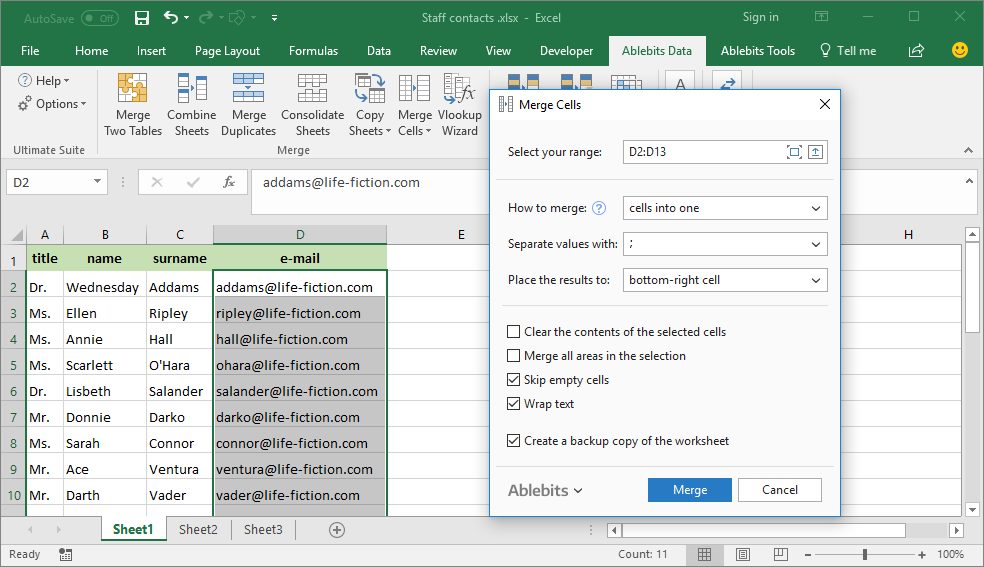
Ablebits Merge Cells is the kind of tool that exists because Excel’s default merge behavior is dangerous for data. Native Excel’s visual merge can keep one value and discard the rest. Ablebits positions Merge Cells around preserving values while combining them into one output, with choices around delimiters and layout.
The official screenshot used here shows the Merge Cells interface for merging cells into one. That is the right mental model: this is not a formatting flourish; it is a controlled content-combination tool.
Where it fits: mailing lists, labels, names, addresses, comments, category strings, and exports where related values need to be collapsed into a single field.
Editorial judgment: strong utility, especially for non-technical users who would otherwise build fragile concatenation formulas and then paste values. The value is not that concatenation is impossible in Excel. The value is reducing the number of small decisions and mistakes around separators, blanks, and output placement.
Watch out for: irreversible-looking workbook edits. Any merge operation that rewrites cell values deserves a saved copy or trial run on a duplicate sheet.
Ablebits Duplicate Remover
Best for: finding duplicate rows or values using one or more key columns.
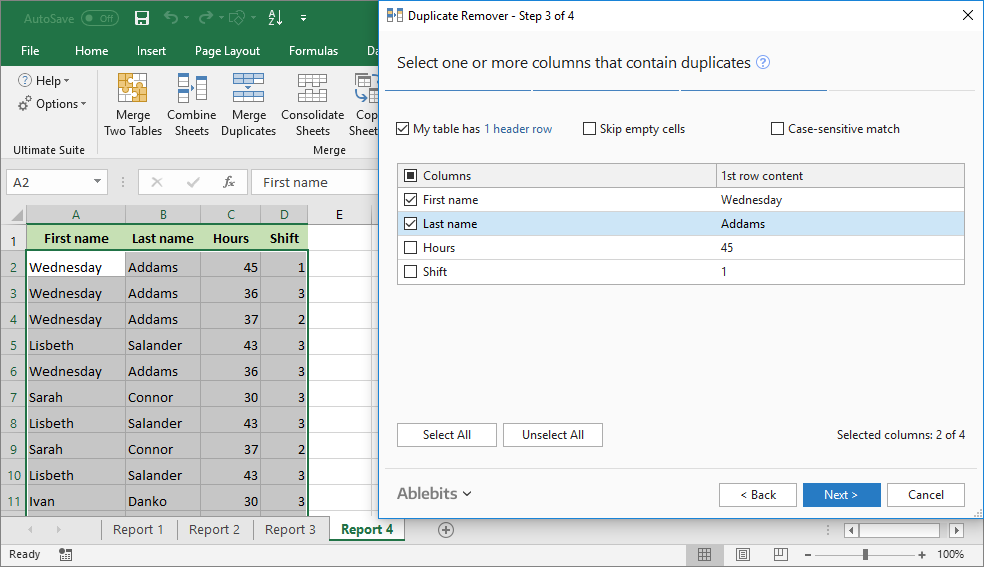
Duplicate Remover is one of the most commercially sensible tools in the suite because duplicate handling is high-risk spreadsheet work. The mistake is rarely “there were duplicates.” The mistake is using the wrong definition of duplicate: same email, same account ID, same name plus date, same SKU plus region, and so on.
The official screenshot shows key column selection, which is the part that matters. A dedupe tool is only useful if it forces the user to define what counts as a match before taking action.
Where it fits: customer lists, transaction exports, inventory records, registration sheets, marketing lists, and any workbook where duplicate removal can damage the data if the matching logic is sloppy.
Editorial judgment: one of the stronger Ablebits tools for business users. Excel has native duplicate handling, but Ablebits’ guided flow is easier to reason through when the matching criteria need to be explicit.
Watch out for: false confidence. A polished wizard does not decide your business rule for you. The user still has to know whether the key is email, invoice number, full row, or a combination of fields.
View Ablebits Duplicate Remover
Ablebits Compare Sheets
Best for: comparing two Excel sheets and surfacing differences in a guided review flow.
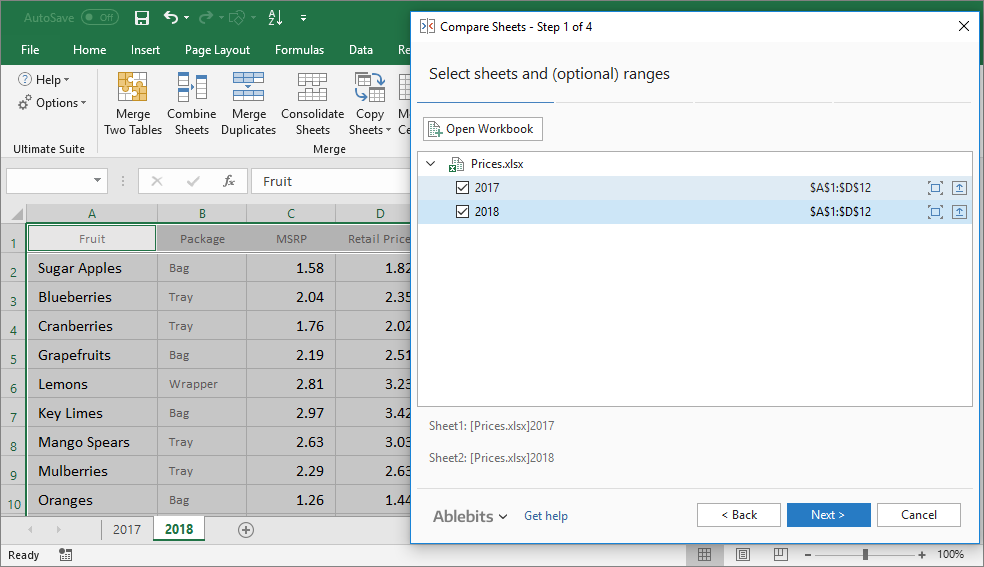
Compare Sheets addresses a classic Excel problem: two workbook versions exist, nobody trusts either one completely, and the differences are buried across rows, columns, formulas, or edited values. Ablebits’ Compare group includes Compare 2 Sheets, Compare Multiple Sheets, and Compare 2 Workbooks in the wider suite documentation, but this review focuses on the named Compare Sheets tool.
The screenshot saved for this post shows worksheet selection for comparison. That is the right first step because comparison tools live or die on scope: which sheets, which ranges, which matching mode, and which differences count.
Where it fits: finance workbook reviews, month-end updates, vendor price lists, edited planning files, operational trackers, and any situation where manual scanning is both slow and unreliable.
Editorial judgment: valuable when Excel remains the review medium. It will not replace disciplined file management, but it can reduce the risk of missing a workbook change when comparison has to happen inside Excel.
Watch out for: structural mismatch. If two sheets have radically different layouts, no comparison wizard can magically know your intent. Expect the best results when the sheets are related versions of the same basic structure.
Ablebits Text Toolkit
Best for: batch text cleanup and transformation inside Excel.
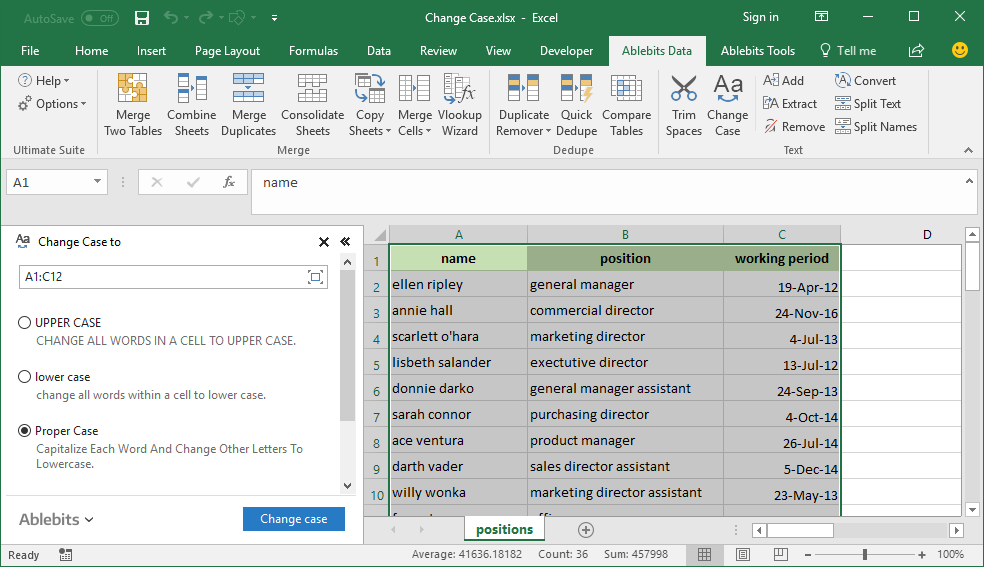
Text Toolkit is less a single job than a cluster of everyday text fixes. Ablebits documentation places tools such as Trim Spaces, Change Case, Add Text, Extract Text, Remove Characters, Convert Text, Split Text, Split Names, Substring Tools, Regex Tools, and related cleanup utilities under the Text group.
The official screenshot used here comes from Ablebits’ Text Toolkit asset set and shows a Change Case workflow. That is a representative example of the category: select the range, choose the transformation, and apply it without building helper formulas.
Where it fits: imported CSV files, CRM exports, inconsistent names, labels, codes, product descriptions, pasted web data, and any workbook where text values need to be standardized before analysis or upload.
Editorial judgment: high practical value because text cleanup is where spreadsheet users waste invisible hours. It is also the area where Power Query can be excellent, so the decision is about workflow preference. If the cleanup is repeatable and governed, Power Query may be cleaner. If it is ad hoc and workbook-local, Ablebits is easier to justify.
Watch out for: over-processing. Text tools can make broad changes quickly. Use a copy of the column or sheet when the original values matter.
Ablebits Random Generator
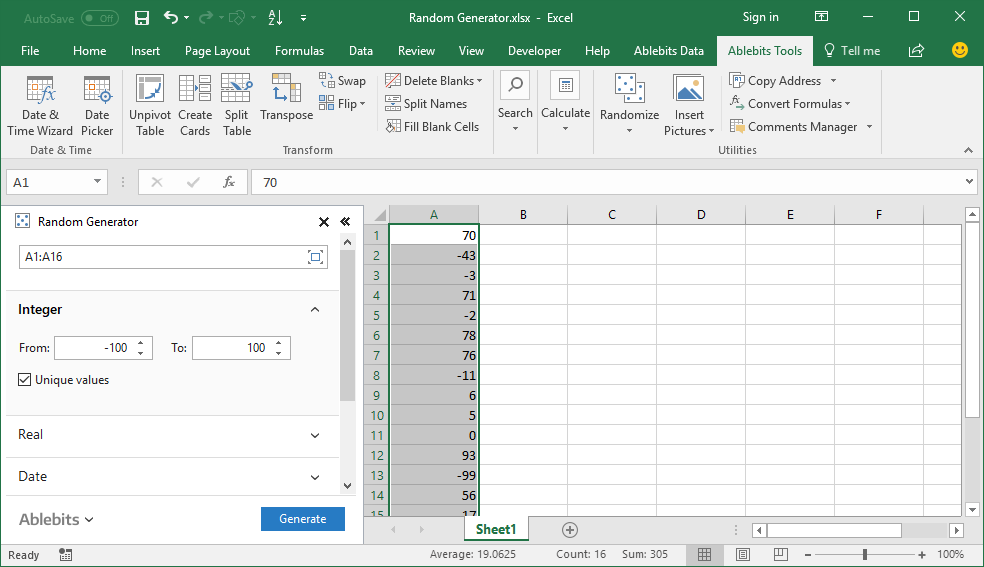
Best for: filling Excel ranges with randomized values such as numbers, dates, Booleans, lists, passwords, or codes.
Random Generator is a utility tool, not the reason most users buy the suite. But it is a useful part of the bundle because sample data is a recurring need in training, testing, mockups, QA files, and spreadsheet demonstrations.
The official screenshot shows random integer generation settings, including range-style controls. Ablebits’ product page also presents random real numbers, dates, Booleans, custom lists, passwords, and codes as supported generation types.
Where it fits: demo workbooks, training files, randomized samples, test imports, placeholder data, and quick models where realistic-looking values are needed before production data exists.
Editorial judgment: useful, but not mission-critical for everyone. Its value rises if you regularly build examples for other people or need randomized fills without writing formulas.
Watch out for: security assumptions. Random password generation shown inside an Excel add-in is convenient, but organizations with formal credential policies should use approved password-management tooling.
View Ablebits Random Generator
Ablebits Date Picker
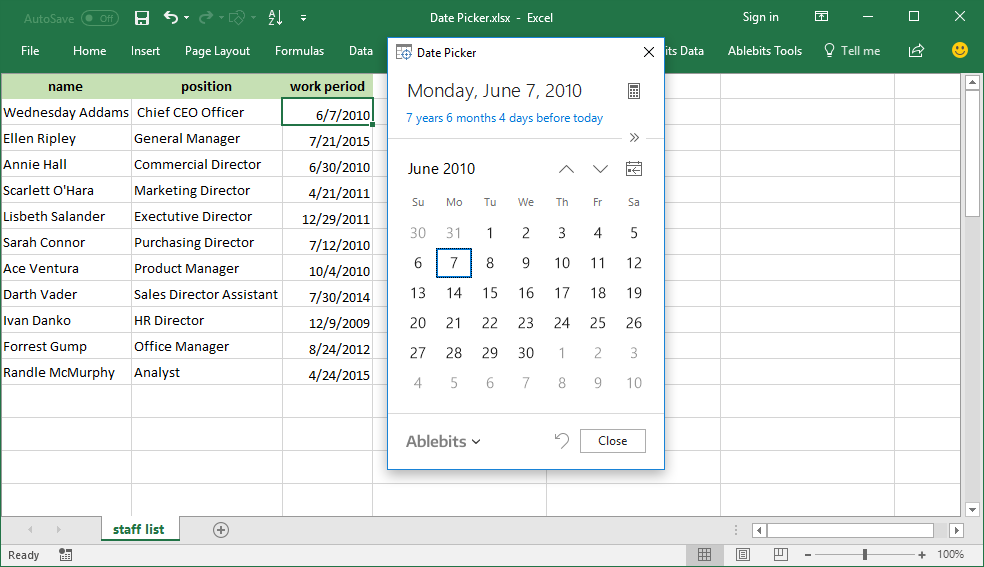
Best for: selecting and inserting dates in Excel from a calendar interface.
Date Picker is simple, and that is its selling point. Date entry in Excel is easy until regional formats, typo risk, and repetitive entry start creating errors. A pop-up calendar removes ambiguity for users who need to enter dates accurately without thinking about formatting conventions.
The official screenshot shows the Date Picker calendar open inside Excel. Ablebits also presents related date functionality such as expanding the calendar and date calculations in the same product gallery.
Where it fits: schedules, deadlines, invoice dates, order dates, project trackers, HR logs, and workbooks maintained by users who should not have to remember date-format rules.
Editorial judgment: small but useful. This is not the deepest tool in Ultimate Suite, but it can be a real quality-of-life feature in shared operational workbooks.
Watch out for: workbook design. A date picker helps entry, but it does not replace validation rules, locked formats, or clear table structure.
Ablebits Spell Number
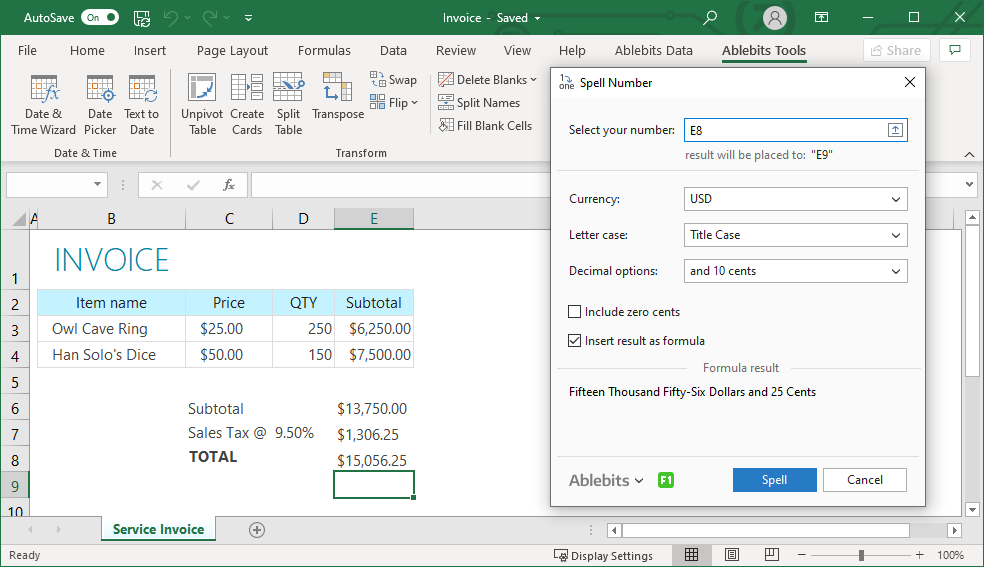
Best for: converting numeric values into written words.
Spell Number is niche in the best way. Most Excel users do not need it every day. But when they do need it, the native experience is poor. Checks, invoices, formal payment documents, and finance templates often require amounts written as words. Building that logic yourself is possible, but it is not where most people want to spend their time.
The official screenshot shows a selected number with options for currency, letter case, and decimals. Ablebits’ product page indicates the output can be inserted through a special custom function, which is preferable to a one-off pasted text result when workbook values may change.
Where it fits: checks, invoices, payment requests, legal or formal finance documents, templates that need amount-in-words fields, and workbooks distributed to non-technical users.
Editorial judgment: narrow, but defensible. This is exactly the sort of utility that makes more sense inside a broader suite than as a standalone purchase.
Watch out for: localization and compliance. Currency wording, decimal phrasing, and legal formatting requirements vary. Verify output against your jurisdiction or document standard before relying on it.
Where Ablebits Fits Against Native Excel
The honest Ablebits review is not “Ablebits versus Excel.” Ablebits runs inside Excel. The real comparison is guided add-in workflow versus native techniques.
Native Excel is better when the logic needs to be transparent, repeatable, auditable, and refreshed. Power Query is especially strong when a cleanup workflow will be run again and again against new data. Formulas are better when the transformation should remain visible in the sheet.
Ablebits is better when the task is frequent but not worth engineering from scratch every time. Workbook comparison, ad hoc text cleanup, one-time merge outputs, guided duplicate review, quick date entry, randomized sample data, and amount-in-words conversion all fit that profile.
That trade-off is why the suite matters commercially. Ablebits is selling a reduction in small spreadsheet chores, not a new analytical paradigm.
Strengths
Broad task coverage. The suite’s strongest argument is breadth. The seven tools covered here span merge, dedupe, compare, text, randomization, date entry, and number spelling.
Guided workflows. The screenshots show wizard-style or panel-style interactions that make choices explicit. That helps users who do not want to write formulas for every cleanup task.
Windows Excel focus. For organizations standardized on desktop Excel for Windows, a dedicated Excel add-in can fit the way people already work.
One-time purchase positioning. Ablebits’ current product page emphasizes pay-once ownership rather than a subscription. For users tired of small monthly SaaS charges, that is commercially attractive.
Limitations
Not a replacement for governed workflows. If the same transformation must be refreshed monthly, documented, reviewed, and handed off, Power Query or a controlled data process may be better.
Windows-first compatibility. Ablebits’ stated Ultimate Suite compatibility is for Excel on Windows. Mac-heavy teams need to verify fit before considering it.
Feature breadth can hide uneven value. Some tools are major workflow savers. Others are convenience utilities. The suite makes sense when you use several of them, not when one tiny feature looks interesting.
Add-in governance matters. Corporate users may need IT approval, deployment controls, and update management before installing any Excel add-in.
Who Should Buy Ablebits Ultimate Suite
Buy Ablebits Ultimate Suite if Excel is still where real work happens in your organization and you repeatedly perform workbook-level cleanup, comparison, and formatting tasks. The ideal user is not a formula hobbyist. It is the person who has deliverables due and needs messy data made usable quickly.
The suite is especially attractive for operations teams, finance users, analysts, admins, consultants, and small businesses that live in exported spreadsheets. It is also useful for power users who know native Excel well but do not want to rebuild the same utility workflows over and over.
Do not buy it just because the feature count is large. Buy it if at least three or four tools map to recurring work. From the seven covered here, the strongest commercial reasons are Duplicate Remover, Compare Sheets, Text Toolkit, and Merge Cells. Date Picker, Random Generator, and Spell Number are useful supporting utilities that strengthen the bundle when they match your workflow.
Final Take
Ablebits Ultimate Suite is a practical Excel add-in suite for people who are paid to get workbook work finished, not to prove they can solve every problem with formulas. The product’s value is clearest in messy, repetitive, business-grade spreadsheet tasks: matching, comparing, cleaning, merging, standardizing, and producing outputs other people can use.
This is not a must-buy for every Excel user. It is a strong candidate for Windows Excel users whose work repeatedly touches the seven Ablebits tools reviewed here, especially if the trial confirms that the guided workflows save enough time to justify the license.
Frequently Asked Questions
Is Ablebits Ultimate Suite worth it for Excel users?
Ablebits Ultimate Suite is most compelling for Excel users who repeat cleanup, comparison, merge, date, text, and utility tasks often enough that a guided add-in saves real time. If you only need one occasional task, native Excel or Power Query may be enough.
Does this Ablebits review include hands-on testing?
No. This is an evidence-based editorial assessment built from Ablebits’ official product pages, documentation, pricing statements, and verified official screenshots. It does not claim independent hands-on testing.
Which Ablebits tools are covered in this review?
This review covers seven named Ablebits tools: Merge Cells, Duplicate Remover, Compare Sheets, Text Toolkit, Random Generator, Date Picker, and Spell Number.
Is Ablebits Ultimate Suite a subscription?
Ablebits presents Ultimate Suite as a one-time purchase with a 14-day free trial, 2 years of free major updates, and paid upgrade paths after that update window. Always confirm current terms on Ablebits before buying.
Does Ablebits Ultimate Suite work on Mac?
Ablebits’ Ultimate Suite pages describe compatibility for Microsoft Excel on Windows, including Excel 2016 through Microsoft 365 and Windows 7 through Windows 11. Mac users should not assume compatibility without checking Ablebits’ current system requirements.
