
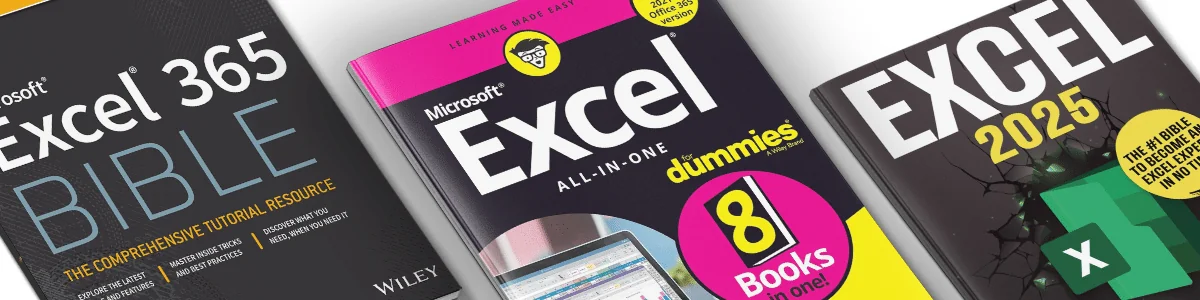
A focused list — eleven Excel books worth keeping within arm’s reach, not fifty random titles scraped from Amazon. Each pick targets a different use case: Copilot-era reference, all-in-one foundation, formulas-only quick reference, advanced VBA, and so on. If a book mostly repeats what another book on the list already covers, it didn’t make the cut.
A note on the 2026 picks. Most Excel books — even recent ones — were written before Microsoft Copilot became a standard Excel 365 feature. The titles below remain excellent for fundamentals, formulas, modeling, and VBA. Pair any of them with hands-on Copilot practice; the fundamentals in these books actually make you better at prompting Copilot, since understanding what Excel can do is the first step to asking AI to do it for you.
Some links on this page are affiliate links. As an Amazon Associate / affiliate, excel.tv earns from qualifying purchases.
At a Glance
| # | Book | Best for | Skill level |
|---|---|---|---|
| 1 | Microsoft Excel 365 with Copilot Bible | Copilot-aware Excel reference | All levels |
| 2 | Excel All-in-One For Dummies | Single-volume broad foundation | Beginner → Intermediate |
| 3 | Excel: The Absolute Beginner’s Guide | Pure beginners | Beginner |
| 4 | Office 365 Bible | Whole Office suite, Excel included | Beginner → Intermediate |
| 5 | Excel in 7 Days | Quick visual onboarding | Beginner |
| 6 | Excel Formulas Quick Guide | Laminated desk reference | All levels |
| 7 | 101 Excel Formulas Guide | Formula-by-formula reference | Beginner → Intermediate |
| 8 | Excel Bible for Beginners | Visual learners, newest features | Beginner |
| 9 | Excel 101 Fast Track | 10-minute daily lessons | Beginner → Intermediate |
| 10 | Excel Tips & Tricks | Power-user shortcuts | Intermediate → Advanced |
| 11 | Excel 2024 Mastery Guide | Beginner-to-advanced in 24 days | Beginner → Advanced |
The Books
The Microsoft Excel 365 with Copilot Bible
Best for: Copilot-aware Excel reference
The first major Excel reference written around AI integration from the ground up. Teaches you to summarise, organise, and visualise data with natural-language prompts alongside traditional Excel skills — and, critically, when to trust the AI’s output and when to verify it.
Pros:
- Dedicated coverage of Microsoft Copilot in Excel
- Step-by-step prompts paired with real Excel outcomes
- Includes guidance on AI ethics and data verification
Cons:
- Copilot examples assume a Microsoft 365 Copilot subscription
- Lighter on classic VBA / macro content than older Bible-line titles
- Newer release with fewer reader reviews to triangulate against
Excel All-in-One For Dummies
Best for: Single-volume broad foundation
Greg Harvey’s perennial all-in-one is still the most reliable single-book introduction to Excel. Each “book within the book” covers a major area (formulas, charts, PivotTables, macros) at enough depth to be useful, not so much that a beginner gets lost.
Pros:
- Covers nearly every Excel surface area in one volume
- Plain-language explanations consistent across every chapter
- Easy to dip into as a reference once you’ve done a first pass
Cons:
- Doesn’t ship with practice files — you build your own examples as you go
- 700+ pages can feel intimidating; treat it as a reference, not a one-sitting read
Excel: The Absolute Beginner’s Guide
Best for: Pure beginners
A shorter, gentler on-ramp than the For Dummies title. Strong if you’ve never opened Excel before and want a guided walkthrough — formulas, formatting, simple PivotTables — with templates and video supplements to follow along.
Pros:
- Step-by-step instructions assume zero prior knowledge
- Bonus templates and video tutorials included
- Large font and clean layout, easier to read for older learners
Cons:
- Occasional typos and print-quality issues reported by reviewers
- Screenshots are black-and-white in the paperback edition
- Some instructions assume a specific Excel version that may not match yours
Office 365 Bible
Best for: Whole Office suite, Excel included
Pick this instead of an Excel-only book if you also need to level up in Word, Outlook, PowerPoint, and OneNote. The Excel chapters cover the essentials thoroughly without trying to compete with a dedicated 700-page Excel Bible.
Pros:
- Same author voice across all Office apps, easier than juggling multiple titles
- Step-by-step instructions with current screenshots
- Useful for small-business owners who use the whole suite
Cons:
- Excel sections won’t satisfy a power user who needs deep PivotTable or VBA content
- Some app sections are denser than others depending on edition
Excel in 7 Days
Best for: Quick visual onboarding
200+ illustrations and a strict day-by-day structure. Useful if you’ve tried other Excel books and bounced off — the heavy visual approach gets you to “I can do this” faster than a wall-of-text guide.
Pros:
- 200+ illustrations make every step concrete
- 100+ practice exercises spaced through the week
- Realistic 7-day commitment instead of an open-ended slog
Cons:
- Some topics feel rushed by design — depth comes from re-reading, not from any single chapter
- Won’t substitute for a longer reference once you’re past the basics
Excel Formulas Quick Guide
Best for: Laminated desk reference
Not a book in the conventional sense — a laminated 6-page fold-out card with the most-used formulas organised for fast lookup. Lives next to the monitor and gets used daily.
Pros:
- Indestructible (laminated) and stays open flat
- Covers the formulas you actually use, not the obscure ones
- Cheap enough to buy one for every analyst on a team
Cons:
- Small font — needed to fit everything on the card
- Not a learning resource on its own; pair with a real book
101 Excel Formulas Guide
Best for: Formula-by-formula reference
A full-book version of the laminated card above — 101 of the most-used formulas, each explained with examples and a use case. Useful for the analyst who needs to look up “how does INDEX-MATCH-MATCH actually work again” without wading through a textbook.
Pros:
- One formula per short section, easy to scan
- Real-world examples for each formula, not abstract syntax
- Works well as supplement to a broader all-in-one book
Cons:
- A few of the more complex formulas could use more context around when not to use them
- Print quality is acceptable but not premium
Excel Bible for Beginners
Best for: Visual learners, newest features
Heavy on screenshots and updated for the latest Excel 2022/365 features. The “minutes per day” framing makes it less intimidating than the bigger Bibles.
Pros:
- Abundant screenshots match a modern Excel install
- Covers newer features (dynamic arrays, LET, LAMBDA at intro level)
- Easy on-ramp for visual learners who struggle with text-only references
Cons:
- Occasional grammar and formula typos reported in reviews
- Won’t satisfy intermediate users — strictly beginner content
Excel 101 Fast Track
Best for: 10-minute daily lessons
Structured as a series of 10-minute daily lessons with custom templates and a bundled GPT-style assistant. Designed for working professionals who can’t carve out long study blocks.
Pros:
- 10-minute lesson format works around a workday
- Bundled templates (budget tracking, project management) you can adapt
- Includes an AI tutor for follow-up questions on each lesson
Cons:
- Pace can feel rushed for complete beginners
- Doesn’t go deep on advanced topics — pair with a heavier reference once you’re past the basics
Excel Tips & Tricks
Best for: Power-user shortcuts
500+ pages of techniques aimed at people who already use Excel daily but want to be faster at it. Strong on keyboard shortcuts, multi-step workflows, and the kind of trick that saves an hour the first time you use it.
Pros:
- Excellent reference once you know the basics — easy to dip into
- Wide coverage from formula tricks to chart hacks to VBA snippets
- Genuinely useful tips, not filler
Cons:
- Black-and-white print makes colour-coded examples harder to follow
- Some examples assume specific Excel versions; verify against your install
Excel 2024 Mastery Guide
Best for: Beginner-to-advanced in 24 days
The most current dedicated mastery title at the time of writing. Structured as a 24-day progression that ends in PivotTables, Power Query, and DAX — a defensible arc from “what is a cell” to “I can build a data model”.
Pros:
- Covers the latest Excel 365 surface area, including dynamic arrays and Power Query
- Real business scenarios as worked examples
- Strong on data analysis specifically, not just generic Excel skills
Cons:
- 24-day pace is ambitious — most learners need closer to 60 days to retain the material
- A few editing issues in the latest print run
- Limited practice files compared to a course
How These Picks Were Chosen
Three filters narrow the field from “every Excel book on Amazon” to the eleven above.
Coverage that’s actually different. A list of fifteen books that all teach “Excel for beginners” wastes your time. Each pick on this list targets a specific use case — Copilot reference, laminated formula card, mastery guide, visual learner intro — so picking the right one is straightforward.
Author track record. Greg Harvey’s For Dummies titles, Michael Alexander’s Bibles, and Bill Jelen’s MrExcel books exist because the same authors have been writing about Excel for decades. New authors get on the list when the book itself clearly demonstrates expertise.
Currency. Excel has changed substantially since 2020 — dynamic arrays, LET, LAMBDA, Power Query maturity, Copilot. Books that still teach Excel as if it’s 2015 don’t make the cut, even if they’re well-written.
Frequently Asked Questions
What’s the single best Excel book for a working analyst?
Excel All-in-One For Dummies if you want one volume that covers everything reasonably well. Excel 2024 Mastery Guide if you specifically want a data-analysis progression. Pair either with the laminated Formulas Quick Guide as a desk reference.
Which book is best if I’m starting from zero?
Excel: The Absolute Beginner’s Guide or Excel in 7 Days, depending on whether you prefer a longer guided walkthrough or a short visual sprint.
Is there a book for VBA and automation specifically?
The strongest titles in that niche — Bill Jelen and Tracy Syrstad’s VBA and Macros: Microsoft Excel, Michael Alexander’s Excel Power Programming with VBA — are dedicated VBA books not included on this generalist list. Pick one of those if VBA is your primary need.
Should I get a physical book or the Kindle edition?
Physical for the formula reference cards and the For Dummies title (you’ll flip back and forth). Kindle for the long-form references where searching beats flipping. Reviewer complaints about print quality are real for some Amazon-published titles — Kindle sidesteps that.
Do these books cover Mac Excel?
Most are written for Excel for Microsoft 365 (Windows), which has the fullest feature set. Mac-specific differences (PivotChart limitations, different keyboard bindings, some Power Query connector gaps) are usually noted in passing rather than as a separate chapter.
How current is this list?
Reviewed and updated annually. The header date reflects the current revision; titles drop off when newer, better-rated equivalents appear.

Comments (36)
Historical comments preserved from the WordPress archive. Commenting is no longer active.
Mike Girvin’s new Ctrl+Shift+Enter Mastering Excel Array Formulas fills in a gap, thoroughly explaining Excel array formulas.
Also – Pivot Table Data Crunching Excel 2013 that I co-wrote with Mike Alexander is the first book to cover regular pivot tables, Power Pivot, Power View and Power Map.
Thank you Bill. Its a real pleasure to have Mr. Excel filling up my comments section.
When I first saw your comment, I tried to get the wife to give me a high-five…
But she wasn’t that into it. Something about me being a nerd. I don’t know 🙂
Anyways. Anything that Mike Girvin does is instantly only the list. I am a big fan of his Youtube Channel “ExcelIsFun”.
I have also been adding to this list daily. I am shocked by how many have you as an author.
If you would like to provide any additional detail on any of your books for my readers… feel free to fill up the comments section…
I have promised the wife no more high-fives though.
Rick
I will mention one book,
Head First Excel: A learner’s guide to spreadsheets by Michael Milton
I have a large collection of books that are worthy of add to your list.
http://www.andypope.info/books/books.htm
Thanks Andy-
You have given me 3 weeks worth of work going through your list. But I am up for the challenge.
Everyone else-
If you aren’t already VERY familiar with Andy’s site. I highly recommend you visit him at http://www.andypope.info/ . He is an Excel MVP that runs one of the premier Excel sites on the web.
Thanks for stopping by Andy.
Rick
Here is my contribution (well i’m the author; and i thought hey, where the h…)
It is a book in Spanish, named “Ya se Excel, pero necesito mas”
(the translation could be: I already know Excel, but I need more)
It’s for those people who are sceptic because they think they know everyting about Excel. And as they go reading they discover a new world
For people who want to go from current basic/intermediate level to actual advanced level.
Here’s the link
http://www.necesitomas.com/excel
I hope you consider it
Thanks for stopping by. The book has been added. I hope that you check in from time to time in the event any of our Spanish readers have questions for you.
Thanks- Rick
Rick,
A few more
Excel Basics To Blackbelt – Dr. Elliot Bendoly
Microsoft® Excel® 2010: Data Analysis and Business Modeling – Wayne L. Winston Ph.D.
Microsoft® Office Excel® 2007: Data Analysis and Business Modeling – Wayne L. Winston Ph.D.
A Complete Guide to PivotTables: A Visual Approach – Paul Cornell
Dashboards for Excel – Jordan Goldmeier
Thanks Winston-
Its always a pleasure to have you on the site. You bring a lot of depth and resources to the table. Dr. Elliot and Jordans book have been added. I didn’t even know Jordan had a book 🙂 I will review Dr Winston’s book soon.
By the way – are you launching an Excel based BLOG ? If so, let me know when it launches so that I can add you to our Resources and Support Page.
Rick
Decision Modeling with Microsoft(R) Excel (6th Edition)
Larry R. Weatherford
ISBN 9780130177896
This has been added, Tommy. Thank you for stopping by the site and adding to the conversation
Rick
Hi Rick,
The blog is up and running: http://dataprose.org/blog. Heavy on Excel and VBA, but wide open to anything related to data, information, business intelligence and data visualization.
Thanks Winston. I have linked to your blog from my Excel Help and Resources Page here http://excel.social/articles/excel-for-small-business/excel-resources/.
Also shooting you an email.
Congrats on the Blog
Rick
Btw, Jordan’s book is slated for Feb, 2014 release according to Amazon.
Thanks Winston.
I am putting together a series of video interviews of many of the contributors to the excel community. I interviewed Mynda Treacy (http://www.myonlinetraininghub.com/) last week and am interviewing Mourad Louha (http://en.excel-translator.de/) any day now.
I bring this up because Jordan has also tentatively agreed to an interview as well. So perhaps I can get him to talk a bit about his upcoming book.
The interviews will start to trickle out over the next week or two.
Rick
Here is another good book – and fun!
http://www.amazon.com/This-Isnt-Excel-Its-Magic/dp/0979215323 by Bob Umlas
Do you actually have the physical books in your library? Elsewise this is a list and not a library…?
Kind regards
Brian
Thanks Brian. If I called it a library somewhere… then GREAT. That should mean I can close down the page at 5pm everyday to get some sleep. Heck — there may even be some government funding in it for me. 🙂
Adding the Excel Is Magic book Now to the 2007 list. Thanks for pointing it out and adding to the conversation.
Rick
“Excellent Presentation”
“F1 Get the Most Out of Excel Formulas & Functions” by Joseph Rubin
This is a fantastic book and one of my favorites. If you write a lot of Excel formulas to solve medium to complex requirements then read through this book a couple of times per year. Essential reading for Data Analysts using Excel.
http://www.amazon.com/Get-Most-Excel-Formulas-Functions/dp/0974636851/ref=asap_bc?ie=UTF8
Cheers,
Kevin Lehrbass
P.E.D. is listed twice under Excel 2007. It is very good, but I’ve was sufficient.
Rick,
I have to thanks you for putting together a great book list!! Just finished Advanced Excel Essentials, incredible book and definitely not like most Excel books on the market.
Can you recommend another brook that talks about “why to do it” rather than “How to”?
If you can’t think of one are there any blog posts that come to mind that speak on this topic?
Thanks!
Thanks Dave. I will give them some thought. I may also ask some of my friends in the Excel publishing world to pipe in with their thoughts.
M Is for (Data) Monkey: A Guide to the M Language in Excel Power Query by Ken Puls (Author), Miguel Escobar (Author)
DAX Patterns 2015 by Alberto Ferrari (Author), Marco Russo (Author)
Microsoft Excel 2013 Building Data Models with PowerPivot (Business Skills) by Alberto Ferrari (Author), Marco Russo (Author)
this are ones that are always near me 🙂
Updated to include Power BI. Thanks for the recommendations Tomislav.
Rick, it is one of the best lists for picking the best Excel books. Inspired by your list, I also made my own list but in bit different angle. You can check my list here (https://www.exceldemy.com/best-excel-training-books/) and your feedback is highly appreciated.
Best regards
Kawser Ahmed
it is one of the best lists for choosing the best work Excel books. Inspired by this list, Highly energetic blog, I liked that a lot.
Collect, Combine, and Transform Data Using Power Query in Excel and Power BI by Gil Raviv is a must!