
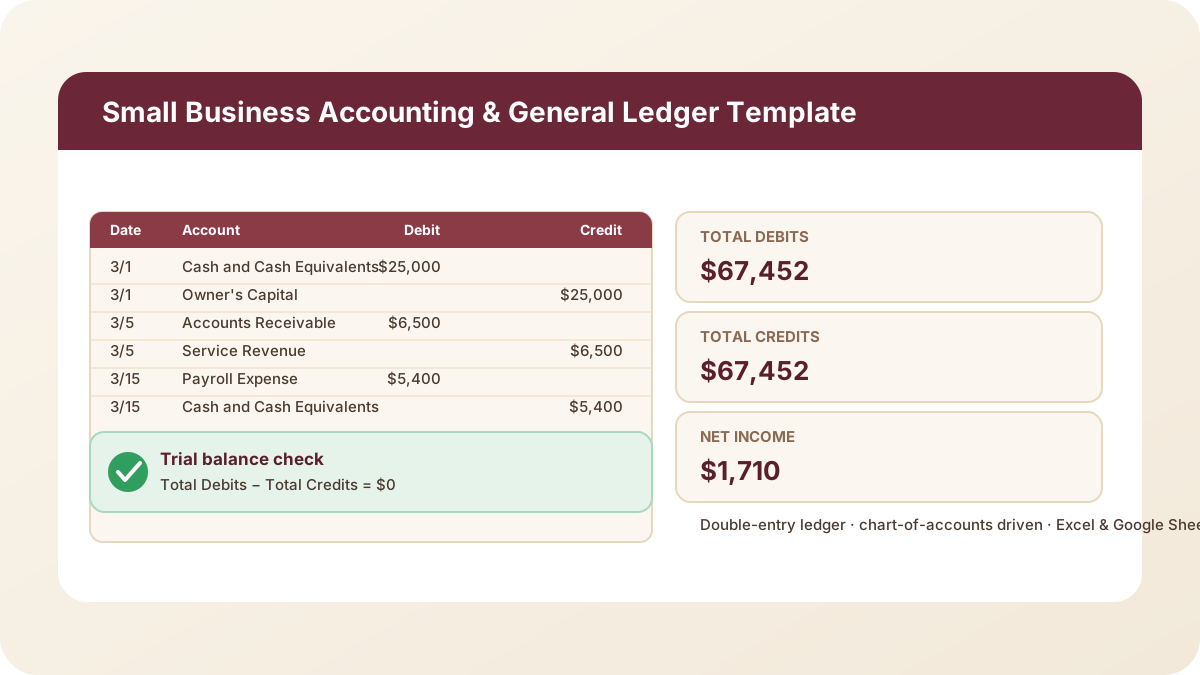
Every small-business owner who’s tried to move off a single-column cash log and into real bookkeeping hits the same wall: a spreadsheet that tracks money in and money out isn’t actually accounting — it’s a checkbook register with extra steps. Real bookkeeping is double-entry, where every transaction touches at least two accounts and the whole system proves itself by summing to zero. This accounting template in Excel is a genuine double-entry general ledger built to make that proof visible.
Download the accounting template in Excel — it’s a plain .xlsx, no macros, no external data connections, and no sign-up required.
Who is this template for?
I built this for a small-business owner, freelancer, or bookkeeper who wants to understand — not just use — double-entry bookkeeping, and who needs a general ledger template excel file that’s honest about what’s happening behind every number. It’s also a good fit if you’re outgrowing a simple income-and-expense tracker but aren’t ready to pay for full accounting software: you get a real chart of accounts, a real ledger, and a real trial balance, with every formula exposed.
If you already have period-end account balances rather than raw transactions to enter, my balance sheet template starts one step later in the process — it shares the same chart-of-accounts idea but takes balances directly instead of deriving them from ledger lines.
What’s in the workbook, sheet by sheet
The workbook ships with five sheets, in this exact order, because each one builds on the sheet before it:
- Instructions — a short setup guide plus a clean-room disclosure: every formula, layout, and sample figure in this workbook was authored from scratch for Excel.TV. No vendor template, workbook, or dataset was downloaded, inspected, or adapted to build it.
- Chart of Accounts — the master list of 18 sample accounts (code, name, account type, normal balance, category, notes). Account Type — Asset, Liability, Equity, Revenue, or Expense — and Normal Balance — Debit or Credit — drive every other sheet’s lookups.
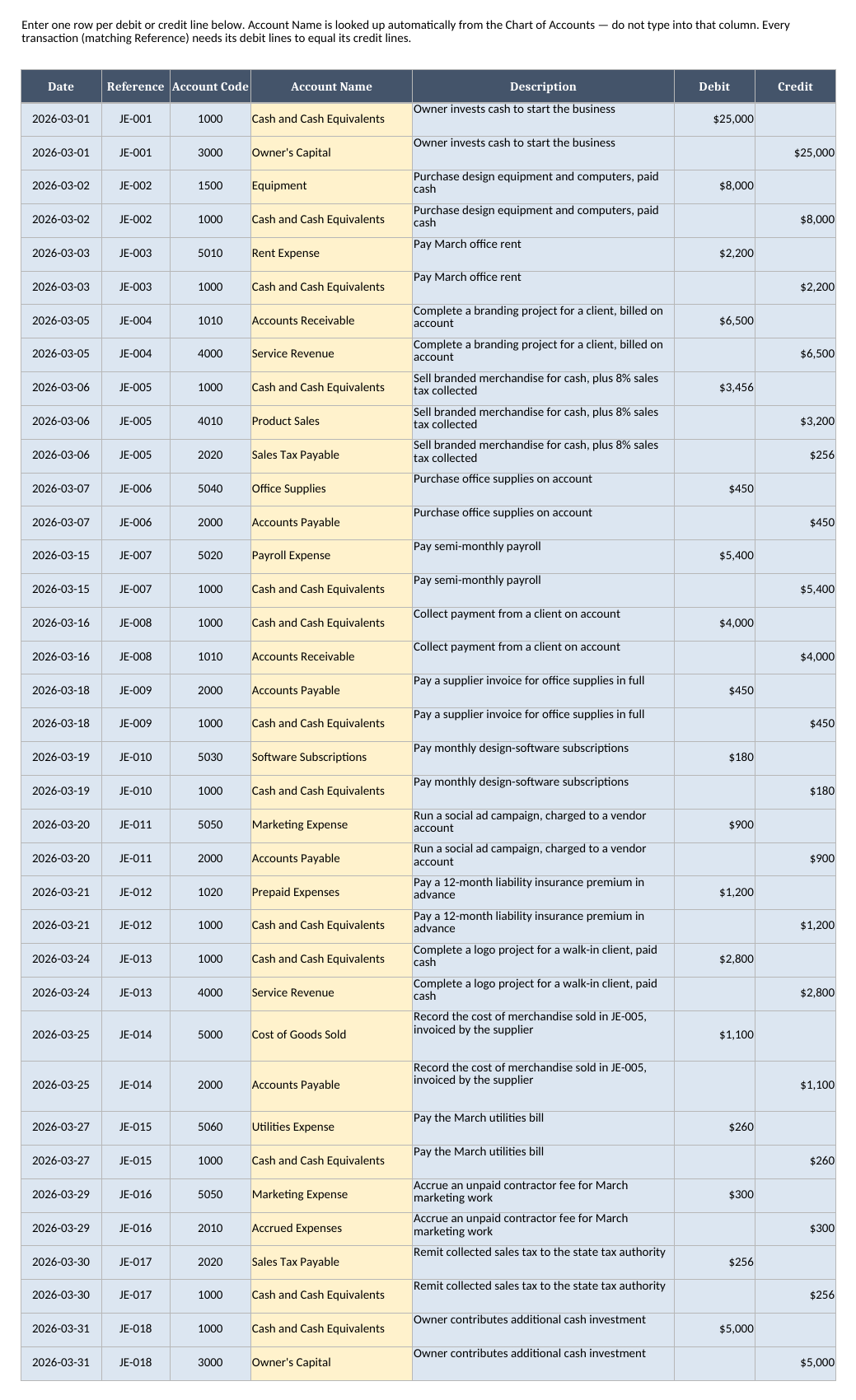
- General Ledger — every transaction, as one row per debit or credit line: date, reference, account code, description, and an amount in the Debit or Credit column. Account Name is looked up automatically.
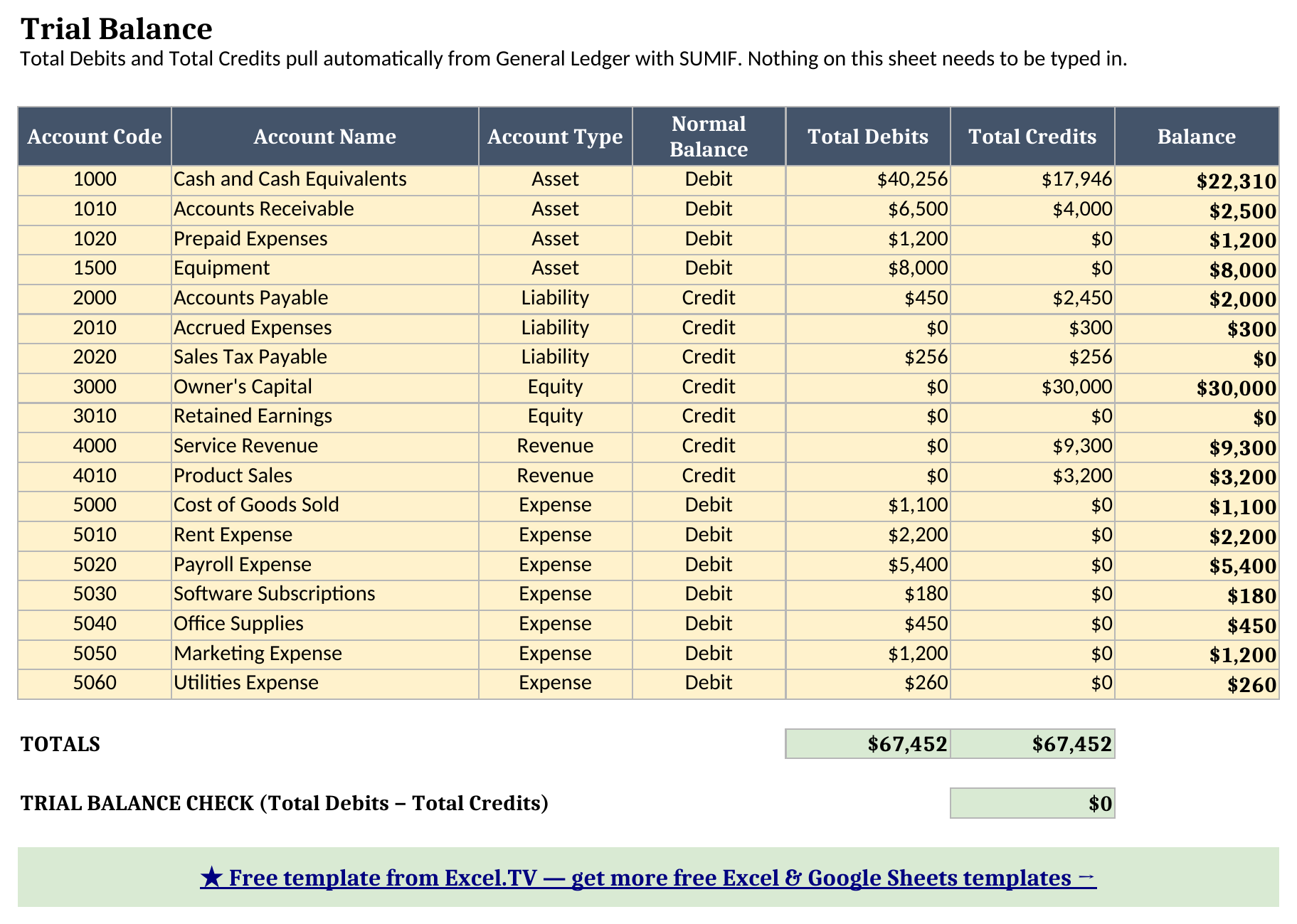
- Trial Balance — one row per account, with Total Debits and Total Credits pulled from General Ledger with
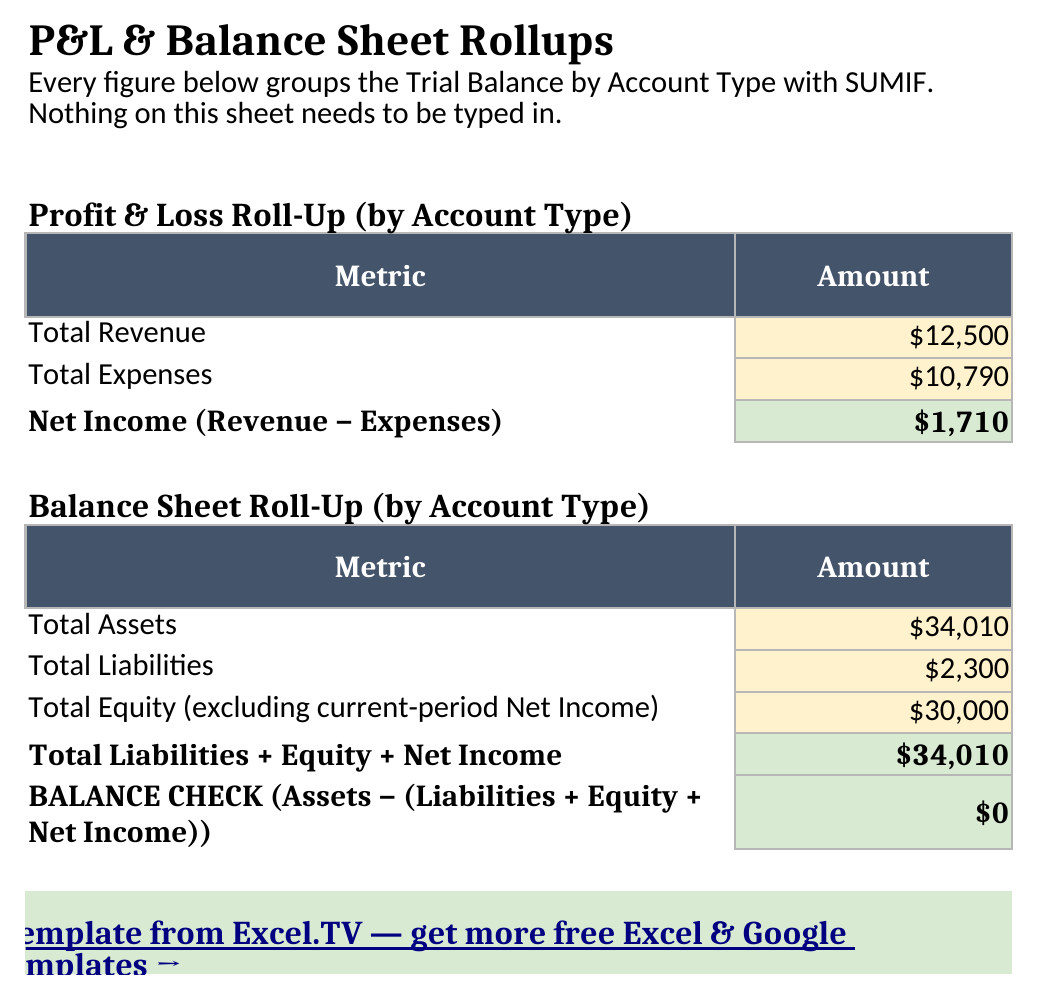
SUMIF, a signed Balance column, and the Trial Balance Check that must read $0. - P&L & Balance Sheet Rollups — those same amounts grouped by Account Type into a P&L view (Revenue, Expenses, Net Income) and a balance-sheet view (Assets, Liabilities, Equity), ending in a second balance check.
The required input is just the General Ledger: a date, reference, account code, description, and a debit or credit amount per line. Everything from Trial Balance onward recalculates automatically the instant you add or edit a ledger line.
How do I set up the accounting template?
- Open Chart of Accounts and adjust the sample account list to match your own books — keep Account Type and Normal Balance accurate, since Trial Balance and Rollups both look up from this list by account code.
- Open General Ledger and enter your own transactions, one row per debit or credit line. Give every line of one transaction the same Reference (like
JE-001), and make sure its debit lines sum to the same total as its credit lines — that’s the one rule that makes double-entry work. - Open Trial Balance to see Total Debits and Total Credits recalculate for every account, and confirm the Trial Balance Check reads $0 before trusting anything built on top of it.
- Open P&L & Balance Sheet Rollups for the Revenue/Expense/Net Income and Asset/Liability/Equity summaries, both pulled straight from Trial Balance.
Because Account Name on General Ledger is an INDEX/MATCH formula rather than typed text, a typo in an account code shows up immediately as “(unknown account)” instead of silently breaking a lookup two sheets later.
Double-entry, explained in plain language
Here’s the idea double-entry bookkeeping is built on, stripped of jargon: every dollar that moves has to come from somewhere and go somewhere, and both of those somewheres get recorded. When the sample business in this workbook pays $2,200 in office rent, the ledger doesn’t just log “spent $2,200” — it records a debit of $2,200 to Rent Expense (where it went) and a credit of $2,200 to Cash (where it came from). Neither line means anything alone; the transaction only makes sense as the pair.
“Debit” and “credit” aren’t good or bad, up or down — they’re just directions, and which direction increases an account depends on that account’s Normal Balance, the fourth column on Chart of Accounts. Asset and Expense accounts have a Debit normal balance, so a debit increases them; Liability, Equity, and Revenue accounts have a Credit normal balance, so a credit increases them. Paying rent is a debit to Rent Expense (increasing an expense) and a credit to Cash (decreasing an asset) — both are increases in their own direction, just on accounts with opposite normal balances.
The Trial Balance sheet turns this from a rule you have to trust into a rule you can watch prove itself. Its Balance column reads =IFERROR(IF(Normal Balance="Debit", Total Debits − Total Credits, Total Credits − Total Debits),0) — converting every account’s raw debit and credit totals into a single signed number in its own natural direction. If every transaction you’ve entered was truly a balanced pair, the sum of every account’s Total Debits column equals the sum of every account’s Total Credits column. That identity is the entire Trial Balance Check — Total Debits − Total Credits — which reads $0 the moment your General Ledger is internally consistent, not because the template forces it, but because balanced double-entry transactions can’t add up any other way.
Worked example: a month of transactions, and where they land
Here’s what the workbook produces for a fictional one-person design studio’s first month in business — 18 transactions, 37 ledger lines — pulled straight from Trial Balance and P&L & Balance Sheet Rollups after a full recalculation, not rounded, not estimated:
| Metric | Amount |
|---|---|
| Total Debits (Trial Balance TOTALS) | $67,452 |
| Total Credits (Trial Balance TOTALS) | $67,452 |
| Trial Balance Check (Debits − Credits) | $0 |
| Total Revenue | $12,500 |
| Total Expenses | $10,790 |
| Net Income | $1,710 |
| Total Assets | $34,010 |
| Total Liabilities | $2,300 |
| Total Equity (excluding current-period Net Income) | $30,000 |
| Balance Check (Assets − (Liabilities + Equity + Net Income)) | $0 |
Two things are worth noticing here. First, $67,452 of debits exactly matching $67,452 of credits isn’t a coincidence built into the demo data — every one of the 18 sample transactions was entered as a balanced pair (or, for the one sale that also collected sales tax, a balanced trio), so the totals were mathematically guaranteed to match before a single formula ran.
Second, look at the last row. Nothing in the Rollups sheet was built to force Assets to equal Liabilities + Equity + Net Income — it just sums Trial Balance’s Balance column by Account Type. That the two sides land on exactly the same $34,010 is the accounting identity working itself out from the ledger data, worth seeing once instead of just taking on faith.
What to do when the ledger doesn’t balance
This is the single most common real problem with any double-entry system. When the Trial Balance Check doesn’t read $0, work through these in order:
- A transaction’s debit lines don’t equal its credit lines. This is the cause well over half the time. Sort General Ledger by Reference and add up the Debit and Credit columns for each transaction — they need to match exactly.
- An account code doesn’t exist on Chart of Accounts. A typo like
1OOOinstead of1000shows “(unknown account)” and, worse, means that line won’t get picked up by any Trial Balance SUMIF — it simply vanishes from one side of the transaction. - An amount was typed into the wrong column. A debit entered in the Credit column flips that transaction’s contribution to the check by double the amount — if your check is off by a suspiciously even number, look for a debit/credit swap first.
- A row was deleted or duplicated mid-edit. Confirm you didn’t leave an orphaned debit line with no matching credit, or duplicate one side of a pair without the other.
Once you’ve ruled those four out, the Trial Balance Check will read $0, and — because of the identity described above — the Balance Check on P&L & Balance Sheet Rollups will read $0 right along with it.
How do I use this in Google Sheets?
Google Sheets is a first-class destination for this bookkeeping template excel file, not an afterthought. Open Google Sheets, choose File > Import > Upload, select the downloaded .xlsx, and pick “Insert new sheet(s).” Every formula — SUM, SUMIF, IF, IFERROR — is natively supported, so nothing needs to be rewritten, and the dropdown validation on Account Type, Normal Balance, and Account Code carries over with it.
If you’d rather skip the download-and-import step entirely, use this one-click copy link: make a copy of the Small Business Accounting & General Ledger Template in Google Sheets. Google will prompt you to save it to your own Drive, and from there it behaves identically to the Excel version — same sheets, same formulas, same Trial Balance Check.
How this differs from the balance sheet template
This template and my balance sheet template share the same code/name/category/notes chart-of-accounts shape — deliberately, since I’d rather you reuse an account list you’ve already built than start over for every workbook in this library. Where they differ is the starting point: the balance sheet template takes period-end account balances as direct input, while this template takes transactions as input and derives every account’s balance from them through the ledger and Trial Balance. That makes this the right tool earlier in the process — while you’re recording the sales, bills, and payroll that happen during a period — and the balance sheet template the right tool at the end of it, once you’re ready to present two periods of final balances side by side.
Once your ledger is running, my finance dashboard template covers budget-vs-actual and variance reporting on top of it; my invoice template generates the client bills that drive Accounts Receivable; and my timesheet template tracks the hours that feed your Payroll Expense line.
Limitations to know before you rely on this
A few things are worth knowing before you put real transactions in:
- Chart of Accounts drives every lookup by row. Add new accounts at the bottom of the list rather than inserting a row in the middle — every SUMIF on Trial Balance references Chart of Accounts, and a row inserted mid-list can shift references out of sync.
- Nothing stops you from entering an unbalanced transaction. General Ledger doesn’t block a debit-only or credit-only entry — that’s exactly why the Trial Balance Check exists, as the sheet that catches what General Ledger itself can’t prevent.
- Retained Earnings opens at $0. The sample ledger models a business’s first month, so there’s no prior-period retained earnings to carry forward. In a real second period, you’d post a closing entry rolling the prior period’s Net Income into Retained Earnings — this template doesn’t automate that entry for you.
- No macros, no external connections. Everything here is a native formula, which keeps the workbook portable between Excel and Google Sheets with zero substitutions.
Grab the accounting template in Excel and swap in your own chart of accounts and transactions — the Trial Balance Check will tell you immediately if something doesn’t add up.
